Gamepad Tester — check your controller online
Plug in or pair your controller, press any button, and the gamepad tester lights up every button, stick and trigger, measures stick drift and the deadzone that hides it, and runs a rumble test with nothing to install.
Gamepad tester
- 1 Plug in or pair your controller
- 2 Press any button
- 3 Press everything, then run the drift test
Controller not showing up? Work down this list:
- Press any button (or move a stick) while this tab is in front.
- Check the cable is a data cable / the pad is paired and its light is on; try another USB port.
- Close Steam Big Picture, DS4Windows and other controller apps, then reconnect.
- Xbox pads on Bluetooth: update the controller in the Xbox Accessories app if it pairs but shows no input.
- PS3 DualShock 3 and some cheap pads need a driver before any browser sees them.
- Still nothing? Try Chrome or Edge, and make sure the page is opened over https.
Connect a controller and press any button
Browsers show a controller only after you press a button on it.
On Nintendo pads the standard layout uses position, so the bottom button (B) is button 0.
This controller has no standard mapping, so the browser cannot say which button is which. Use the raw values below.
Controller
- Index
- —
- Mapping
- —
- Buttons
- —
- Axes
- —
- Vibration
- —
- Last input
- —
Drift test
Put the controller down, press the button and keep your hands off both sticks for 5 seconds.
Left stick
—
- Average offset
- —
- Peak offset
- —
- Recommended deadzone
- —
Right stick
—
- Average offset
- —
- Peak offset
- —
- Recommended deadzone
- —
Thresholds are our rules of thumb: games use different deadzones.
Deadzone
Apply to: Both sticks. Set your in-game inner deadzone to the smallest value that keeps the Game sees dot at 0 when you let go.
Circularity
Circularity error —
Lower is rounder. Values above 1.0 in the diagonals come from pads that report a square range; that is the controller's output, not a fault.
Report rate
Report rate —
This is how often your browser receives new data, not the controller's internal rate. Chrome-based browsers read controllers about every 4 ms, so faster USB pads show about 250 Hz.
0 of 0 tested
Press and release every button once. Presses counts each press; a press that follows a release within 40 ms is marked as a possible double press.
Strong is the heavy low-frequency motor, Weak the light high-frequency one. Browsers stop one effect after 5 seconds.
Buttons
Axes
How to test your controller with the gamepad tester
When a pad lands on my bench, the first five minutes never change: every button, sticks at rest and at full tilt, triggers to the stop, then rumble. Connect by USB or Bluetooth and press any button. Until you do, the tool shows Connect a controller and press any button, and that is not a fault: the W3C Gamepad specification lets a browser reveal a controller only after a button press or stick movement, so pages cannot fingerprint what is plugged in.
- Pick your pad. Each controller gets a chip, P1 to P4; a pad that drops out reads Disconnected for 5 seconds. The info line shows its id, Index, Mapping, Buttons, Axes, Vibration and Last input.
- Work through the Buttons tab. Press and release each button. The checklist counts up ("12 of 17 tested") and Presses counts every press. A possible double press flag means one press registered twice within 40 ms: switch chatter from a worn membrane or dirty contact.
- Pull both triggers to the stop. LT / RT (L2 / R2, ZL / ZR) should reach 1.00 under Max. One that tops out at 0.90 is worn, blocked by a trigger stop or bent by a driver curve.
- Check the sticks. On the Sticks tab, roll each stick around its edge, click it in, let go and run the drift test.
Xbox, DualSense, DualShock 4, Switch Pro and most generic USB pads work. Pads with the standard mapping get a drawing with names you can switch under Labels (Auto, Xbox, PlayStation, Nintendo, Numbers). A pad with Mapping "none — raw layout" gets no drawing, because the browser cannot say which button is which; read it on the Raw values tab.
Checking for stick drift
Drift means the stick reports movement while nobody touches it. Rest values jitter, and what nudges your character is the worst moment, not the average, so one glance is not enough. Press Start drift test, take your thumbs off during the 3-second countdown, and both sticks are sampled every frame for 5 seconds; touch a stick and the test stops so you can start again. You get Average offset, Peak offset, a verdict and a Recommended deadzone.
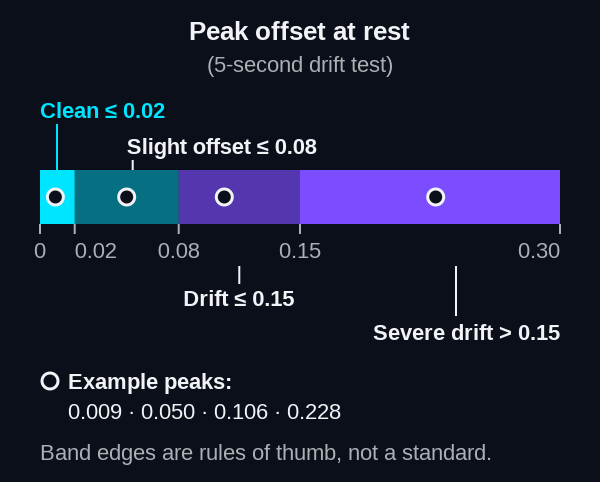
Worked example: the right stick of a well-used pad rests at (0.07, 0.05), (0.08, 0.06), (0.09, 0.05), (0.08, 0.07).
- Average position: (0.080, 0.0575). Average offset = √(0.080² + 0.0575²) = 0.0985, shown as 0.099 (9.9 %).
- Peak offset, the largest single distance: √(0.08² + 0.07²) = 0.106 (10.6 %).
- Between 0.08 and 0.15: Drift.
- 0.106 + 0.02 margin = 0.126, rounded up: Set inner deadzone to 13 %.
The bands and the 0.02 margin are my own rules of thumb from opening pads; no standard defines them. Many games ship an inner deadzone around 5–15 %, which is why a Slight offset rarely shows in play. Drift or worse? My repair order is in how to fix stick drift.
Deadzone: what number to set in your game
An inner deadzone ignores a small circle around the centre. A good one stretches the remaining travel back to the full 0–1 range, so you keep top speed and get no jump at the edge. That scaled radial deadzone is what the Deadzone slider simulates (0–30 %, default 10 %); the hollow Game sees dot shows what the game would receive.
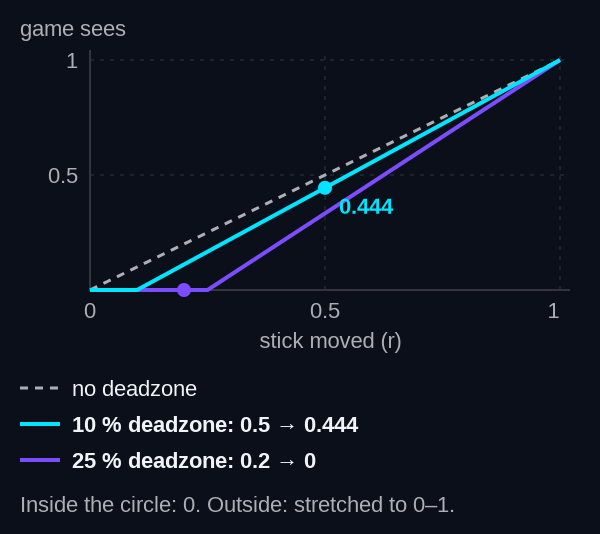
With 10 %, a resting stick at (0.03, 0.04) has r = 0.05, inside the circle: the game sees (0, 0). Halfway at (0.3, 0.4), r = 0.5 and output = (0.5 − 0.1) ÷ 0.9 = 0.444, so the game sees (0.267, 0.356).
The cost of overdoing it: at 25 % a gentle 0.2 push gives the game nothing; at 10 % it still gives 0.111, so slow walking and fine aim survive. After a drift test, press Use in simulator, flick the stick and let go a few times. Set your in-game inner deadzone to the smallest value that keeps the Game sees dot at 0 every time. Games differ in deadzone shape, so fine-tune from there.
Circularity and report rate
Pick Left stick or Right stick, press Start circularity test and rotate slowly along the edge two or three times. The result appears as soon as all 36 sectors are covered. It then refines for one more lap, and the test stops by itself, on Finish, or 1 second after you let go of the stick. The tool keeps the farthest reach in each of 36 sectors of 10° and reports Circularity error, the average distance of those reaches from 1.0. A perfect circle scores 0.0 %, a stick reaching only 0.95 sideways 2.3 %, and a pad that reports a square range 16.0 %, because its corners reach 1.414. That is its output, not damage. No official limit exists; I compare left against right, and the stick clearly worse than its twin is usually the worn one.
Measure report rate counts fresh reports while you keep a stick moving for 5 seconds. Each carries a new timestamp, so 251 distinct timestamps from 1000 to 2000 ms are 250 intervals in one second: ≈ 250 Hz, a 4.0 ms gap. Chrome-based browsers read controllers about every 4 ms, so faster USB pads still show about 250 Hz there. It is what the browser receives, not the pad's internal rate.
Vibration test
Strong motor drives the heavy, low-frequency rumble, Weak motor the light, fast buzz, and Short pulse fires both for 200 ms. Trigger rumble appears only when the browser reports it for your pad. For your own mix, set Strong, Weak and Duration and press Play; Stop cuts it. Loop repeats the effect until you press Stop. The spec recommends a 5-second cap per effect, so Duration ends at 5000 ms.
| Browser | Vibration test |
|---|---|
| Chrome 68+, Edge 79+, Opera 55+ | Yes |
| Samsung Internet 10.1+ | Yes |
| Safari 16.4+ on Mac | Yes |
| Firefox | No |
| Safari and other browsers on iPhone / iPad | No |
Controller not detected?
After 10 seconds without a pad, the Not detected? panel opens by itself. What works most often: press a button with this tab in front; use a data cable and another USB port; close Steam Big Picture, DS4Windows and similar apps, then reconnect; use https in Chrome or Edge. Works here but not in a game? That is usually XInput versus DirectInput, covered in controller not detected on PC. For pairing a DualSense or DualShock 4, see how to connect a PS5 or PS4 controller to a PC.
Button names by controller
The standard layout numbers buttons by position, not by the printed letter, so the bottom face button is 0 even where Nintendo prints B.
| Button | Xbox | PlayStation | Nintendo | Position |
|---|---|---|---|---|
| 0 | A | Cross | B | right cluster, bottom |
| 1 | B | Circle | A | right cluster, right |
| 2 | X | Square | Y | right cluster, left |
| 3 | Y | Triangle | X | right cluster, top |
| 4 / 5 | LB / RB | L1 / R1 | L / R | shoulder buttons |
| 6 / 7 | LT / RT | L2 / R2 | ZL / ZR | triggers (analog on most pads) |
| 8 / 9 | View / Menu | Create / Options | − / + | centre left / right |
| 10 / 11 | LS / RS | L3 / R3 | LS / RS | stick clicks |
| 12–15 | D-pad Up, Down, Left, Right | left cluster | ||
| 16 | Xbox | PS | Home | centre |
Axes 0 and 1 are the left stick, 2 and 3 the right stick. Up and left are negative.
The math behind the verdicts
The gamepad tester runs entirely in your browser through the Gamepad API; nothing is uploaded, and Copy report only fills your clipboard. Axes run −1 to 1 and buttons 0 to 1, per the W3C specification. Offsets show three decimals. The recommended deadzone is peak plus 0.02, rounded up to a whole percent, kept within 3–30 %. Recheck the tool against these cases:
| Input | Expected result |
|---|---|
| Deadzone 10 %, stick (0.03, 0.04) | Game sees (0, 0) |
| Deadzone 10 %, stick (0.3, 0.4) | Game sees (0.2667, 0.3556) |
| Rest samples (0.03, 0.02) (0.04, 0.03) (0.035, 0.025) | Average 0.043, peak 0.050, Slight offset, 7 % |
| Rest samples (0.07, 0.05) (0.08, 0.06) (0.09, 0.05) (0.08, 0.07) | Average 0.099, peak 0.106, Drift, 13 % |
| Rest samples (−0.18, 0.10) (−0.20, 0.11) (−0.19, 0.12) | Average 0.220, peak 0.228, Severe drift, 25 % |
| Square-range trace, 360 points | Circularity error 16.0 % |
| Trace reaching 0.95 sideways, 1.0 up and down | Circularity error 2.3 % |
| Timestamps every 4 ms from 1000 to 2000 | Report rate ≈ 250 Hz |
| Timestamps every 8 ms, 126 of them in one second | Report rate ≈ 125 Hz |
A browser cannot see gyro, battery, firmware, stored calibration or adaptive-trigger resistance; for those you need the maker's software or a console.
Guides
 How to fix stick drift: cleaning, calibration and stick replacementMeasure first, then clean, recalibrate, update and only then open the pad: the drift fixes in the order I use them, with the cheap ones first.6-minute read
 Controller not detected on PC? Fixes for Xbox, PlayStation and SwitchLight on, Windows chimes, the game still ignores your pad? Find the broken link: cable, Bluetooth, apps that grab the pad, or XInput vs DirectInput.5-minute read
 How to connect a PS5 or PS4 controller to a PC: USB, Bluetooth, SteamUSB is fastest, Bluetooth takes a minute, Steam makes most games accept it. Pair a DualSense or DualShock 4 with a PC and check it works.5-minute read
Things people ask
Can I test a PS5 DualSense controller online?
Yes. Connect it by USB-C or Bluetooth and press any button; buttons, sticks and L2 / R2 show up with PlayStation names under Labels. Gyro, the light bar and adaptive-trigger resistance are not visible to web pages.
What is the difference between stick drift and deadzone?
Drift is the stick reporting movement at rest; the deadzone is the circle a game ignores around the centre. Drift shows up in a game only when the peak offset is bigger than that game's deadzone.
What is a good circularity error?
Lower is rounder, and there is no official limit. Pads that report a square range read around 16 %, which is their output and not a fault, so compare sticks of the same pad or pads of the same kind.
Can a browser measure controller polling rate?
It measures how often the browser receives new data, which Chrome-based browsers cap at about 250 Hz. Use it to compare pads in the same browser, not as the controller's internal rate.
Why doesn't the vibration test work on my iPhone?
Safari and the other browsers on iPhone and iPad have no vibration API for controllers, and neither does Firefox. Use Chrome or Edge on a computer, or Safari 16.4+ on a Mac.
Is anything about my controller uploaded?
No. The gamepad tester runs in your browser, and Copy report only puts plain text on your clipboard. Your last results and settings stay in this browser's local storage.
Updated